
Overview
Integrating analytics tracking involves three parts:- Install tracking script & Verify - Create an analytics embed, add the tracking script to your site, and verify it’s working
- Identify Users - Link the anonymous_id (generated by the script) to known users in your system with the customer_id from Pocketflows
- Send Conversions - Report conversion events when users complete purchases (same set up as triggers)
Prerequisites
- A valid
project_idandsecret_keyfor API authentication - An existing
business_idfor the business you want to track
Authentication
All API requests use Basic HTTP authentication. Pass yourproject_id as the
username and secret_key as the password.
Install tracking script
An analytics embed represents a tracking instance for a specific business website. It generates the unique script URL you’ll install on your site and stores thewebsite_url for installation verification.
Step 1: Create an Analytics Embed
Request
Parameters
website_url - The URL where the tracking script will be installed
Response
Create one analytics embed per business. You do not need a separate embed
for each page or subdomain. If you ever need to rotate an embed for
operational reasons, simply create a new one and replace the script tag on
your site.
Step 2: Install the Tracking Script
Add this script tag to the<head> section of your website:
Cross-domain tracking: If a user’s journey spans multiple domains — for
example, a business site at This ensures the
example.com that links to a booking flow on
bookings.example-app.com — add the data-cross-domains attribute with a
space-separated list of domains:anonymous_id is carried across domains so Pocketflows tracks
the entire session as one user journey. For ad platforms like Google Ads,
Pocketflows automatically handles cross-domain linking behind the scenes using
the recommended linker approach, so conversions are correctly attributed even
when the user navigates between domains.Step 3: Verify Installation
Request
How It Works
When you call check, we:- Fetch the website_url you provided
- Scan the HTML for the expected script tag
- Update last_script_request_at if found
- Update last_event_at with the most recent attribution event (if any)
Response
Part 2: Identify Users
Link theanonymous_id (generated by the tracking script) to a Pocketflows
customer_id after the user signs up and is synced to Pocketflows.
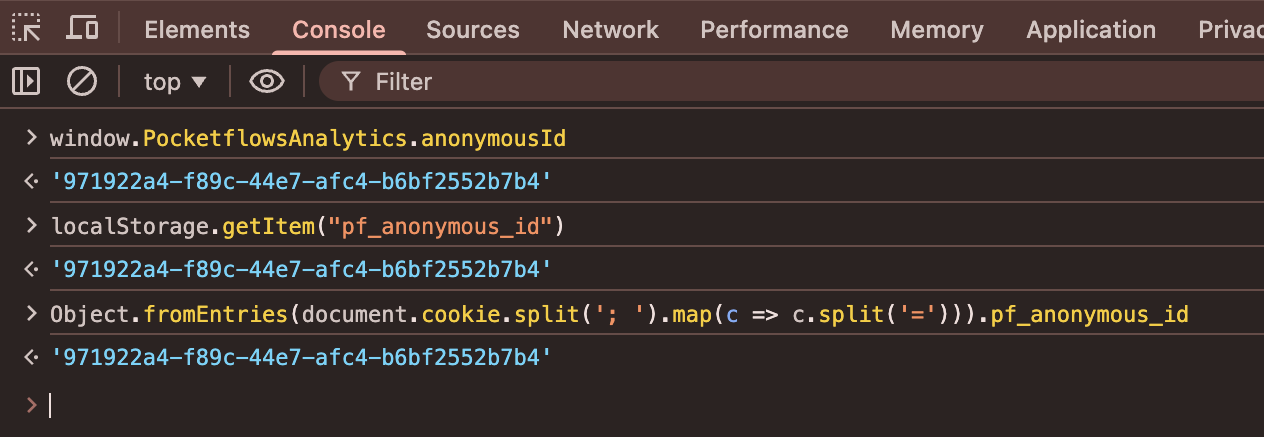
Accessing the Anonymous ID
Once the tracking script is installed, you can access theanonymous_id from
the browser:
pf_anonymous_id, so
it persists across sessions.
Identifying Customers
After a user signs up and is synced to Pocketflows, callidentify to link
their anonymous session to their customer record.
Using the Pocketflows customer ID:
When using
customer_external_id, we’ll automatically retry a few times to
account for any delay in syncing the customer to Pocketflows. Make sure the
customer is synced within 4 hours of the identify call — Pocketflows will
stop retrying after that window, and ad platforms like Google Ads require
conversion data promptly to attribute it correctly.- Links all previous events from this anonymous_id to the customer
- Associates all future events from this anonymous_id with the customer
Part 3: Send Conversions
Send purchase events the same way you send trigger events for emails and SMS. When you create the project-level event, you can explicitly define thepurchase_amount_path based on the event data.
Coming soon: A dashboard setting to tag which events should be considered
purchase events for attribution.
How Attribution Works
When a purchase event is received, Pocketflows automatically:- Looks up the customer and finds their last touch point based on tracked UTM
parameters (e.g.
ad_campaign_id,campaign_id,trigger_id,email_blast_id). - Attributes the conversion to the marketing source that drove it using last-touch attribution.
- Sends the conversion event to the ad platform (e.g. Google Ads) on your behalf, so the platform can optimize bidding and reporting in real time.